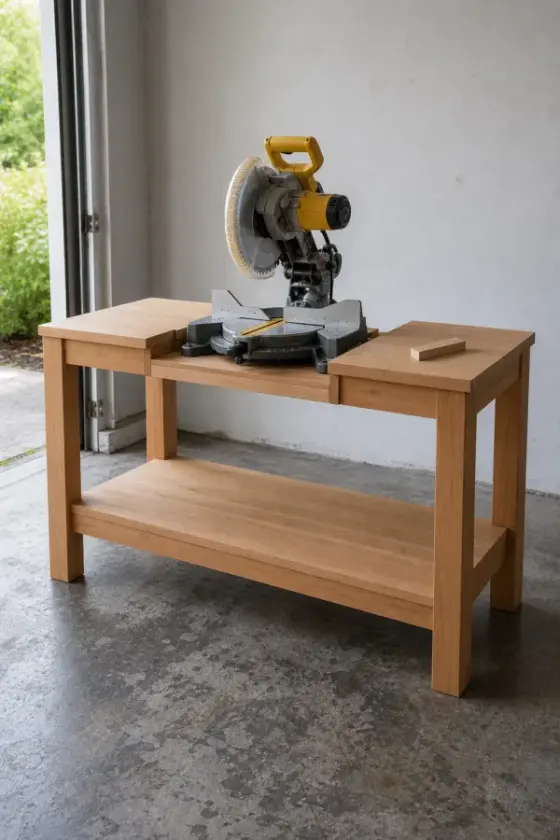
What you’ll build
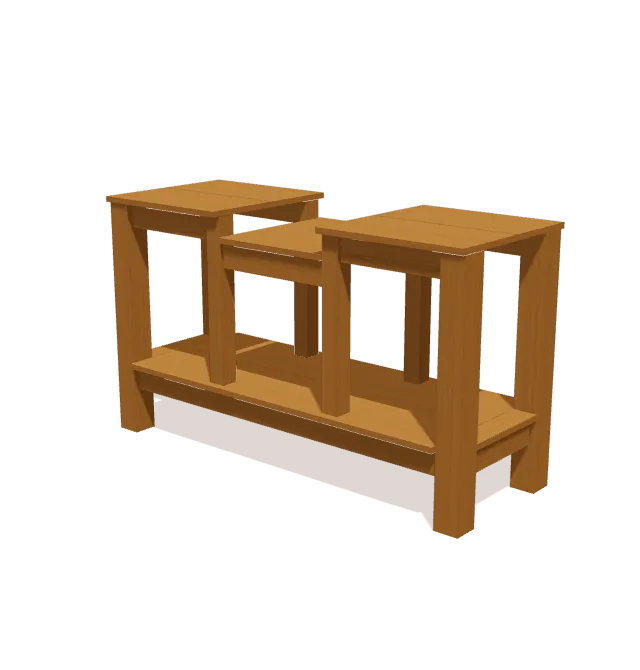
Four 34″ 4x4 corner legs and four 23¼″ 3x3 inner legs frame the stand. 2x4 stretchers and two 1x12 planks make the lower shelf. The saw sits on a 17½″ × 21″ panel set 3½″ below the wings. Measure your saw’s table height and adjust that drop before you cut the inner legs and aprons.
Shopping list
Buy these boards. The list fits every cut onto standard lengths and leaves ⅛″ for each saw cut and ¼″ for trimming board ends.
| Lumber | Length | Qty |
|---|---|---|
| 4x4 | 8 ft | 2 |
| 2x4 | 8 ft | 3 |
| 1x12 | 8 ft | 2 |
| 1x4 | 8 ft | 1 |
| 3x3 | Cut to length | 4 |
| 3/4 in oak panel | Cut to length | 1 |
Cut list
All 27 parts, grouped so you can cut matching pieces together. Exact lengths and end-cut angles for every part are in the free plan in the TimberLab app.
| Part | Lumber | Qty |
|---|---|---|
| Leg | 4x4 | 4 |
| Inner Leg | 3x3 | 4 |
| Upper Apron | 2x4 | 4 |
| Tabletop | 1x12 | 4 |
| Lower Stretcher | 2x4 | 2 |
| Lower Stretcher | 2x4 | 2 |
| Apron | 2x4 | 2 |
| Lower Shelf | 1x12 | 2 |
| Lower Shelf | 1x4 | 2 |
| Tabletop | 3/4 in oak panel | 1 |
Tools
- Tape measure
- Pencil
- Speed square
- Eye & ear protection
- Drill
- Miter saw
- Circular saw
- Clamps
- Sander
Step-by-step instructions
Assemble Left Outer Frame
Lay the two 34-inch left 4x4 legs flat on a work surface. Align the 14-inch lower side stretcher between their inside faces, positioned 6 1/2 inches up from the bottom ends. Clamp the joints flush with the leg faces, checking that the frame remains square.

Assemble Right Outer Frame
Lay the two 34-inch right 4x4 legs flat opposite the first assembly. Fit the 14-inch lower side stretcher between the legs, matching the 6 1/2-inch height from the base. Clamp the assembly firmly with both leg faces flush.

Connect Lower Stretchers
Lay Lower Shelf Planks
Position Inner Support Legs
Fit Upper Wing Aprons
Fit Center Drop Aprons
Set Recessed Platform
Place Wing Tabletop Planks
Get the full plan: all 9 steps and every cut length.
Download TimberLab and open Miter saw stand in the catalog to get every cut length and end-cut angle, all 9 assembly steps in 3D, and Timbo, the AI build helper. Catalog plans are free to open; some features, such as AI edits, require a subscription.


Shop loads are heavy and concentrated. Check that the frame is square and rigid before loading it, and mount tools following their manufacturer’s instructions.
Change the size or design
This plan is one of the projects in the TimberLab app’s catalog. In the app you can turn the model in 3D, follow the assembly steps one part at a time, and ask for changes in plain words, such as “make it 6 inches shorter” or “add a shelf”. The cut list and shopping list update to match the new design.
Questions about this plan
How much lumber do I need to build this miter saw stand?
The shopping list calls for 2 × 4x4 at 8 ft; 3 × 2x4 at 8 ft; 2 × 1x12 at 8 ft; 1 × 1x4 at 8 ft; 4 × 3x3 (cut to length); 1 × 3/4 in oak panel (cut to length). It groups every cut onto standard board lengths and leaves room for saw cuts and trimming the board ends.
How big is the finished miter saw stand?
It is 60″ wide, 34 ¾″ tall, and 22 ½″ deep.
What tools do I need?
You need a tape measure, pencil, speed square, eye & ear protection, drill, miter saw, circular saw, clamps, sander.
Can I change the size of this miter saw stand?
Yes. Open the miter saw stand in the TimberLab app and describe the change in plain words, such as “make it 6 inches shorter”. The 3D model, cut list, and shopping list update together.
Where can I get the full miter saw stand plan?
The full plan, with every cut length and all 9 assembly steps in 3D, is free in the TimberLab app. Download TimberLab on the App Store and open the miter saw stand in its catalog.